
This post contains affiliate links. If you buy through them, I may earn a small commission at no extra cost to you.
The first time I bought an eSIM for a cruise, I stared at the options (1GB? 3GB? 5GB? 10GB?) with no idea which to pick. I even asked AI to help me guess, and in the end I took a punt on 5GB for a two-week cruise… and ended up topping up.
I’m a lot more savvy about it now, though I wouldn’t call myself an expert. On our most recent two-week cruise, three of us used about 13GB of data across nine sea days, plus a fair bit more on our unlimited eSIM in port.
So if you’ve decided on an eSIM and you’re now looking at the sizes wondering how much data you need for a cruise, this is for you. It’s worth getting it right first time: bigger bundles usually work out cheaper per GB, but buy far too much and you’ve paid for data you never use.
Table of Contents
The short answer
For a typical two-week cruise:
- Very light use (messages, emails, the odd call): about 1–2GB
- Most people: 3–5GB, if you’re a bit careful
- Lots of video: 6GB or more
Going for a week? Roughly halve it. The more sea days on your itinerary, the more you’ll lean on your eSIM. In port you might be able to use WiFi or a land eSIM, but don’t count on it: sometimes it’s easy, and sometimes it’s trickier than you’d like. And of course you’ll still want your phone back on board in the evening.
What does 1GB actually buy you?
This surprised me more than anything. Most of what we do on our phones uses hardly any data at all. It’s video that eats it.
Messages and calls
| What you’re doing | Roughly how much 1GB gets you |
|---|---|
| WhatsApp or iMessage texts | More than you’ll ever send |
| Photos sent on WhatsApp | About 2,000 |
| Emails (no big attachments) | Thousands |
| WhatsApp voice calls | About 50 hours |
| FaceTime audio calls | About 20 hours |
| WhatsApp or FaceTime video calls | About 3–4 hours |
If you’re choosing between the two for voice calls, WhatsApp is the lighter option: FaceTime audio often uses around twice as much. For video calls there’s not much in it.
Browsing and social
| What you’re doing | Roughly how much 1GB gets you |
|---|---|
| Duolingo | Hundreds of lessons |
| Browsing websites | About 16 hours |
| Facebook (posts and photos) | About 8 hours |
| Facebook with lots of videos and Reels | About 2 hours |
Watching and listening
| What you’re doing | Roughly how much 1GB gets you |
|---|---|
| Streaming podcasts | About 20 hours |
| Netflix, lowest setting | About 3 hours |
| Netflix, standard quality | About 1½ hours |
| Netflix, HD | About 20 minutes |
Rough guides only. Your phone, your app settings and the ship’s connection all make a difference. Sending WhatsApp photos in HD or letting videos download automatically uses far more. On an iPhone, turning on Low Quality Image Mode (Settings › Apps › Messages) keeps iMessage photos small.
My own example: I had a 27-minute WhatsApp voice call home from the middle of the Atlantic, and it used 7MB. That’s less than 1% of a gigabyte. Another 19-minute call, which included a few minutes of video, used 8MB. Video calls do work at sea, but they can be laggy. If you want to show someone your cabin, sending a recorded video is often the better bet.
You’ll see some eSIM guides suggest higher figures than these. They’re usually based on fast connections on land, where apps happily use more. At sea the connection is slower, so most apps use a bit less.
How much data do you need? Pick your luggage
Working out data is a lot like packing. Some people breeze through with hand luggage, and some need the big case plus an overflow bag. Find the one that sounds most like you.
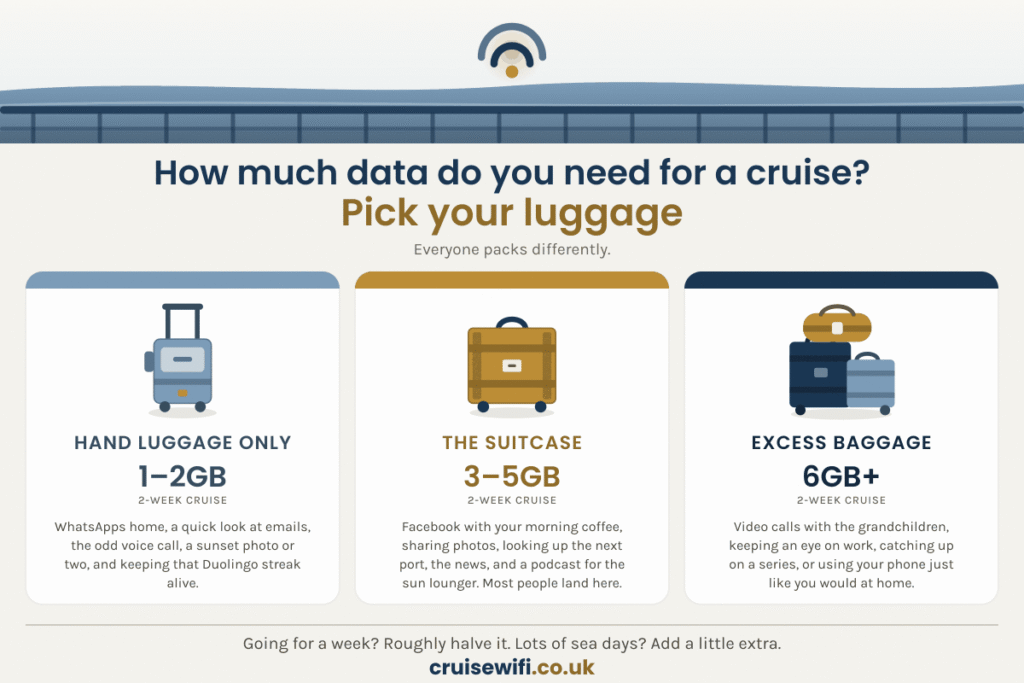
🎒 Hand Luggage Only: about 1–2GB for a two-week cruise You want to stay in touch, not stay glued to your phone. WhatsApps home, a quick look at emails, the odd voice call, a photo or two of the sunset, and keeping that Duolingo streak alive. You’ll be surprised how far 1GB goes.
🧳 The Suitcase: about 3–5GB for a two-week cruise You’ll be on your phone a fair bit, and why not? You scroll Facebook with your morning coffee, share photos as you go, maybe an Insta post, look up what to do in the next port, read the news and download your favourite podcast for the sun lounger. Most people I talk to land here.
🧳🧳 Excess Baggage: 6GB+ for a two-week cruise Life doesn’t stop just because you’re on holiday. Maybe it’s video calls with the grandchildren or elderly parents, keeping an eye on work, catching up on a series, or simply wanting to use your phone as you would at home, without the worry of the GB ticking away. Video is often what pushes you into this bracket, and that’s absolutely fine; it just means sizing up.
Work out your number
- Pick your luggage. Which description sounds most like your normal holiday self?
- Think about your itinerary. Lots of sea days in a row, like a transatlantic, means more time relying on your eSIM. A port-heavy cruise means a bit less daytime use.
- Add a little extra. Running out mid-ocean is far more annoying than having a bit left over.
- Travelling together? Add up the luggage. A Hand Luggage partner plus a Suitcase teenager is a different total from two Excess Baggage travellers. You can each have your own eSIM, or share one bundle from a hotspot phone. Can the whole family share one eSIM? explains how that works.
If you’d like to play with the numbers in more detail, Saily has a handy data usage calculator. It’s built for travel in general rather than cruises, so it may come out a little higher than you’ll need on a sea day.
A data bundle or unlimited?
Once you know your size, the type of plan follows quite naturally.
A fixed data bundle (like GigSky) suits Hand Luggage and Suitcase cruisers. You pay for a set amount, use it at your own pace and can top up in the app if you need to. Bundles usually get cheaper per GB as they get bigger, so if you’re torn between two sizes, the bigger one is often the better value.
Unlimited (like Maya Mobile) suits Excess Baggage cruisers, as you stop counting altogether. You pay by the length of your trip rather than by data, so it costs more up front, but nobody is rationing photos on the last sea day. Check your ship is covered before you buy (Telenor ships not covered).
For a very light user, a single 1GB eSIM like Red Bull MOBILE or GoMoWorld can be enough on its own.
One thing my husband learned the hard way: top up before you run out. You need data to buy more data. He ran his eSIM right down to nothing before topping up, so he had to borrow our hotspot to sort it out. He didn’t make that mistake twice.
Our real numbers: three of us, two weeks, 13GB
For the curious, here’s how our data went. Between the three of us we had about 15GB of sea data, set up like this:
- The “hot phone”. Our spare phone became our hotspot phone, hence the name. It held a 10GB GigSky bundle for sea days and a Maya Mobile unlimited eSIM for port. Whenever we were together, we connected to it like WiFi.
- Our own small eSIMs from Red Bull MOBILE and GoMoWorld: 2GB each for my husband and me, and 1GB for my daughter, so everyone had something of their own when we were apart.
We got through about 13GB. So we used most of what we had, and nobody went without. That’s roughly 4GB each over two weeks: firmly Suitcase territory.
The biggest surprise was the voice calls, which cost us almost nothing. The sneakiest drain was a 4GB WhatsApp backup that started on its own when my phone joined the hot phone, because it thought it was on WiFi. Luckily I spotted it fairly quickly. (In my defence, I’m in rather a lot of WhatsApp groups, and some of them do love a video.) It’s well worth switching backups off before you sail.
And the moment that made the data feel worth every penny? A message from home: my son had cracked the windscreen on our car. Over the next couple of hours I was on calls with him to talk it through, rummaging through Google Drive on my phone to find the insurance policy, then researching windscreen replacement and how the claim works. All from the middle of the Atlantic, and all sorted before we reached land. You just never know what to expect, and that’s why being able to keep in touch is so important to me.
Make your data go further
A few habits that make a big difference:
- Download before you sail. Shows, podcasts and offline maps for the ports, downloaded on home WiFi, cost you nothing from your eSIM. (With BBC iPlayer you’ve no choice anyway, as it won’t let you download abroad.)
- Save the heavy stuff for free WiFi or your unlimited eSIM in port. Photo backups and app updates can wait.
- Turn off automatic backups and updates before you sail, especially WhatsApp’s.
- Choose voice over video unless you really need to see each other.
More tips coming soon in a full guide to stopping your apps eating your data.
The bottom line
Most cruisers need less data than they fear, unless video is part of the plan. Pick your luggage, think about your sea days, add a little extra, and you’ll get it about right first time.
Last updated November 2026. This post contains affiliate links for GigSky, Maya and Saily. I get a small commission if you buy through them, at no extra cost to you. Most of the data on our transatlantic trip was gifted by the providers so I could test it. That didn’t change anything I’ve told you about how much we used. More on how that works →
Still deciding which eSIM?
Answer a few questions, get a personalised recommendation in under a minute.